Posts

Showing posts with the label How To

Serve GZip CSS and JS from AWS S3

Amazon Simple Storage Service (Amazon S3) is an object storage service that offers industry-leading scalability, data availability, security, and performance. This means customers of all sizes and industries can use it to store and protect any amount of data for a range of use cases, such as websites, mobile applications, backup and restore, archive, enterprise applications, IoT devices, and big data analytics. If you are looking to gzip  your static JS and CSS when hosting on S3, however, it’s not obvious how to do so, and results often bring up other AWS hosting services as well. Here’s the quick and simple way to serve gzipped JS and CSS from AWS S3. S3 needs those files compressed before they are uploaded, it can’t do the actual gzipping for us. This is done with a simple command, which I recommend be added as a script to your build step, or your continuous integration process. gzip -9 /filepath/bootstrap.js or gzip -9 /filepath/bootstrap.css The -9 denotes tha...
Create windows services in C#

In this blog post, we will go over on how to create windows services in C#. Windows services are started when OS boots and runs the service in the background. It can start automatically or can be made to start, stop or run based on manual trigger. Here is how you can create your own windows service: Open Visual Studio, go to File > New and select Project. Go to Visual C# -> ”Windows Desktop” -> ”Windows Service,” give your project an appropriate name and then click OK. Once you click OK, there will be a black screen with Service1.cs[design] file opened. Now, right click on a blank area, and select Add Installer. We need to add installers to windows service before you run the service, which registers with service control managers. After adding installer, it adds ProjectInstaller.cs to the project. Once you view the code of Project Installer, you would see InitialiseComponent method. Once you go to the definition of it, here you can mention the name of service, descripti...

Enable CORS with a dynamic list of origins

Creating a NuGet Package

Supporting HTTP Method OPTIONS

CORS support in Web API

If you read the Web API tutorials from docs.microsoft.com, all of them are teaching you to create the server app (Web API) and the client app in the same solution. In fact, we usually separate the server and client application into separate applications. You will then find out the client application cannot call any Web API method in the server application. It is because of the CORS. What is CORS? CORS stands for Cross-Origin Resource Sharing. CORS is a W3C standard that allows a server to relax the same-origin policy. Using CORS, a server can explicitly allow some cross-origin requests while rejecting others. CORS is safer and more flexible than earlier techniques such as  JSONP . This tutorial shows how to enable CORS in your Web API application. If your application is ASP.NET Web API 2, now you could do the following to enable CORS Install Microsoft.AspNet.WebApi.Cors from Nuget Open file App_Start/WebApiConfig.cs. In Register method, add this code config.Ena...

Implementing the Singleton pattern in C#

Single Sign On (SSO) using Cookie in .Net

Build C# objects dynamically

How to check what data of yours Google has gathered

Here is how you can check what data of yours has Google gathered: https://www.google.com/maps/timeline?pb Google stores your location (if you have it turned on) every time you turn on your phone, and you can see a timeline from the first day you started using Google on your phone. . https:// myactivity.google.com/myactivity   Google stores search history across all your devices on a separate database, so even if you delete your search history and phone history, Google STILL stores everything until you go in and delete everything, and you have to do this on all devices http://www. google.com/settings/ads/   Google creates an advertisement profile based on your information, including your location, gender, age, hobbies, career, interests, relationship status, possible weight (need to lose 10lbs in one day?) and income https://myaccount.google.com/permissions Google stores information on every app and extension you use, how often you use them, where you use the...

How to check what data of yours has Facebook gathered

Facebook in past few weeks has seen the biggest onslaught both from media and from users. Facebook is accused of sharing the data of users to UK based consulting firm, Cambridge Analytica. Now if you want to see what data of yours is being gathered and shared with Ad Agencies and other firms, here is what you should do:   From your desktop, visit the page – https://register.facebook.com/download/ Clicking on the link will lead you to your account setting page. Below the General Account Settings option click on ‘Download a copy’ link. Once clicked, you will see a ‘Download your information’ page with an option to click on ‘Download Archive’. Clicking on that will open a dialogue box asking for your password. Once the password is provided, there will be a prompt saying that Facebook will notify you once the data is ready to download.   Once ready, you can click on the notification and download the .zip file on the desktop. After downloading, extract the files and click o...

Create a Central Logging System

Image
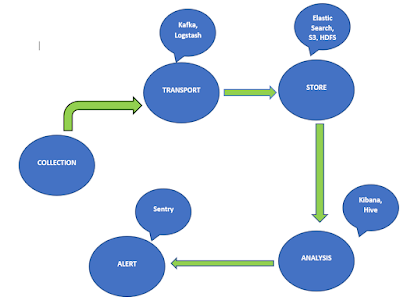
Logging is the most important part of any system. They give you insights about the application, what kind of errors are occurring and what components are causing the errors and also about how the application is reacting and working when something wrong happens. The usual practice is almost every application write to logs either in the file system or in Database. If your application is running on multiple hosts then designing a central logging system becomes crucial since you can collect, aggregate and maintain logs at one centralized location and do operations on top of them. There are many tools available to which can solve some part of the problem but we need to build a robust application using all these tools.                                                                           Create...

Redis Hash Datatype for .NET developers

Redis Hash Datatype are similar to Dictionary in C#. Redis Hash datatype is a mapping of key as string and value as a string. Redis hashes are memory optimized. var hashKey = “hashKey” ;    HashEntry [ ] redisMerchantDetails = {      new HashEntry ( “Name” , “Ravindra Naik” ) ,      new HashEntry ( “Age” , 26 ) ,      new HashEntry ( “Profession” , “Software Engineer” )    } ;    redis . HashSet ( hashKey , redisMerchantDetails ) ;    if ( redis . HashExists ( hashKey , “Age” ) )    {      var age = redis . HashGet ( hashKey , “Age” ) ; //Age is 26    }    var allHash = redis . HashGetAll ( hashKey ) ;    //get all the items    foreach ( var item in allHash )    {      //output      //key: Name, value:...

Using Radis Hashes .NET

Redis Hashes are essentially maps between string fields and string values. Here I have published on how to get started using Redis with .NET . Once you have installed StackExchange.Redis and have setup console script as per above link, here are the things to do for using Redis Hashes with .NET. Create a new visual studio console project. Then right click select on Manage Nu-Get packages and select online option and search for “StackExchange” in the search field and install  StackExchange.Redis . Now to get connected to Redis and its database here is a snippet.   // This should be stored and reused var redis = ConnectionMultiplexer.Connect(“localhost”); // IDatabase is simple object which is cheap to build IDatabase db = redis.GetDatabase(); Lets create a data object.           var readObject = new ReadObject(); readObject._id = “3”; readObject.Name =”Ravi”; readObject.Age = “26”; readObject.Address = “Bangalore, India”; Now le...